Design Thinking
Industry : Ergonomics
Role : UX Designer
Design Tool: vectary.com
Duration: 6 Weeks
Project :
To enhance user experience during the shift to home-office setups.
Goal:
Design a functional and ergonomic desk setup to enhance productivity and comfort in home-office environments.
Key Outcomes:
-
Developed a desk prototype tailored to the unique challenges of remote work.
-
Focused on ergonomic design to ensure comfort during extended work hours.
-
Addressed space constraints and multi-purpose usage of home spaces.
Role:
Designer, leveraging tools to prototype a model that simplifies the home-office transition.
Result:
A conceptual desk design offering practical solutions for productivity and comfort in lockdown scenarios.
Project
Overview
Ever felt the frustration of working from home in a cramped, uncomfortable space that drains your energy and focus? During the UX Mastery course, I took on the challenge to redesign the home office experience—transforming discomfort into productivity. By diving deep into Design Thinking, I uncovered user insights through research, tested ideas with my team, and refined solutions through constant iteration. The result? A harmonious blend of ergonomics, usability, and aesthetics. This journey not only redefined my approach to problem-solving but also showed how design can turn everyday struggles into empowering experiences. Curious about the transformation? Let’s dive in!
Why I Focused on
Home Office
Experience?

From Chaos to Comfort: Ever turned your kitchen table into a desk or your couch into an office chair? Remote work made us adapt—but at what cost to comfort and productivity
Shared Struggles, Real Solutions: Strained posture, cluttered spaces, and constant distractions—sound familiar? I took on these common frustrations to create workspaces people actually want to work in.
Designing for Everyday Challenges: What if your workspace didn’t just support you but energized and focused you? That’s the transformation I aimed to achieve using Design Thinking.
Your Struggle, My Inspiration: The same discomfort you felt inspired me to dig deeper. Through research and empathy, I found actionable insights to solve these universal problems.

Case Study
Approach
Every design journey begins with a question: What is the problem, why does it matter, and how can it be solved? In this case study, I followed this 'What,' 'Why,' and 'How' framework to guide my process. When I discovered workspace disorganization was a major challenge, I delved into why it hindered productivity and comfort for remote workers. This led to iterative solutions centered on ergonomic design and decluttering. By structuring my approach this way, I not only solved the problem but also ensured every step of the process was intentional and user-focused.

Walking in Their Shoes: Unlocking User Perspectives
"What does a cluttered desk and an aching back teach about design?"
My research into remote work uncovered deeper struggles—poor ergonomics and workspace distractions. Curious about how these shaped innovative solutions?
"When was the last time your chair reminded you of your sitting hours?"
Conversations with users revealed personal pain points—customizable setups, quiet zones, and better lighting. These nuances inspired meaningful design decisions. Want to know how?
"Can a better lamp brighten your workday—and your workflow?"
I turned user frustrations into design opportunities, ensuring every solution addressed real-world challenges. Curious about the process?
"Why does a cluttered workspace feel like a productivity roadblock?"
Insights from remote workers guided my design solutions. What would you change about your own workspace?
"How can user stories transform design decisions?"
Research revealed the need for ergonomic improvements and personalization. Let me share how I made remote workspaces functional and inspiring. Interested?
Dual Lens: Researching Remote Work Pain Points
The pandemic reshaped how we work, but it also revealed struggles. I started my research by examining trends:

Investment in Home Office Setup: 91% of remote workers made efforts to set up their home offices, with 90% spending an average of $282 on the setup
Popular Workspaces: 32% of remote workers use a dedicated home office, while 31% work from the bedroom, and 23% from the living room
Types of Chairs Used: 28% of workers use ergonomic chairs, 24% use conference chairs, and 15% use wooden chairs.
Work Positioning: 53% work seated at a desk, while 17% work from their bed or sofa.
Using Secondary Research to Drive User Interviews
Using secondary research, I created questions to explore user needs and interviewed four team members to uncover key challenges.

The questions were designed to explore:
-
Personal work habits and preferences.
-
Workspace setup during the transition to remote work.
-
Ergonomics, organization, and daily challenges in their current setups.
-
Coping mechanisms for issues like noise, lighting, and connectivity.
-
Tools and methods for capturing ideas and staying productive.
These insights aimed to uncover patterns and pain points, providing a clear foundation for actionable design solutions.
I conducted in-depth Zoom interviews ,to gain a comprehensive understanding of user needs, structuring the questions into two focused sections:
Section 1: About the User 1) What is your name, profession, and location? 2) Describe the kind of environment you prefer for work.
Section 2: Work and Workspace 1) How did you set up your workspace at home during the lockdown? 2) What are your daily work activities, and how does your current setup support or hinder them? 3) Describe your workspace and the tools you use: -- Chair and its comfort for work. -- Keyboard, mouse, and mouse pad experience. 4) How do you manage your workspace organization, especially wire management? 5) What is your work schedule, and how do you spend your breaks? 6) Describe the lighting in your workspace: -- Natural vs. artificial light exposure and its impact. 7) How do you use sockets/charging units in your workspace? 8) Share your experience with handling video calls and managing background noise. 9) Have you faced internet or power issues? If yes, how do you tackle them? 10) How do you capture ideas or take notes during work?
Insights Extracted from Primary Research

Jinal - Visual Designer
Mumbai
Pain Point: Jinal struggles with distractions and inefficient workspaces, impacting her productivity.
Insight: The lack of a dedicated, quiet workspace and ergonomic seating hampers focus.
Design Influence: Designed solutions focused on creating private, quiet spaces with ergonomic furniture for enhanced productivity.

Khushal - UX Designer
Jaipur
Pain Point: Poor workspace organization and inadequate lighting significantly hinder his productivity.
Insight: A structured workspace with proper lighting is essential for focused work.
Design Influence: Introduced elements for improved workspace organization and lighting in the design.

Neha - Accountant
Mumbai
Pain Point: Shared workspace with family causes distractions and discomfort from unsuitable seating.
Insight: An ergonomic workspace that combines comfort and functionality is crucial.
Design Influence: Focused on ergonomic design elements to ensure comfort and reduce distractions.

Nidhi - Salesforce Developer
Uttar Pradesh
Pain Point: Shared spaces, eye strain from artificial lighting, and wrist pain from inadequate equipment.
Insight: Nidhi needs a well-lit, ergonomic workspace that supports long hours of productivity.
Design Influence: Designed a well-lit workspace with ergonomic equipment, including proper seating and lighting solutions.
These stories fueled my mission: to design solutions that bring order, comfort, and productivity to chaotic remote setups. By blending data with human experiences, I crafted a product that truly meets user needs.
Identifying Key Problems

Workspace Challenges
Distractions During Work:
Family interruptions hinder focus due to the lack of a dedicated room.
Cluttered & Disorganized Workspaces: Limited space made managing items inefficient
Poor Cable Management: Makeshift setups caused cable clutter, confusion, and inefficiency.

Ergonomic Issues
Posture and Back Pain: Users faced discomfort and poor posture due to low-quality chairs and lack of back support.
Lack of Footrest: Cluttered under-table spaces compromised seating positions.
Wrist Pain: Prolonged mouse use without support led to wrist discomfort.

Health and Safety
Eye Strain: Long hours under artificial light and bright screens led to dry eyes.
Unsafe Extension Cords: Poorly placed cords posed risks of water spillage and tripping

Productivity Barriers
Lack of Note-taking Space: Overcrowded desks left no room for note-taking during meetings.
Distractions During Meetings: Household noise and low-quality earphones disrupted focus.
Innovate and Ideate Solutions
Once the core problems were defined, I transitioned into ideation using the Crazy 8 Technique to encourage rapid idea generation. In just 8 minutes per problem, I generated diverse concepts, some unconventional, to tackle challenges creatively. Among the 71 ideas, key proposals included improving workspace accessibility through intuitive digital tools and optimizing user flow for seamless task management.


Crazy 8: Unlocking Ideas in 8 Minutes
I employed the Crazy 8 Technique to generate 71 ideas for addressing user challenges, ensuring a mix of practical and innovative solutions. This phase laid the groundwork for impactful, user-centered design decisions.

Prioritizing What Matters Most
Among the 12 identified problems, one stood out for its immediate impact on the user experience: workspace organization. Users often spend hours at their desks, struggling with limited space and cluttered tools. I focused on addressing this pain point by conceptualizing a spacious table that accommodates all essential items while keeping the workspace tidy and organized.
This solution directly enhances productivity, reduces distractions, and creates a more comfortable and efficient work environment. By tackling this problem, I ensured users could focus better and work more effectively, setting the stage for a significant improvement in their daily routine.
The Solution: Workspace Organization
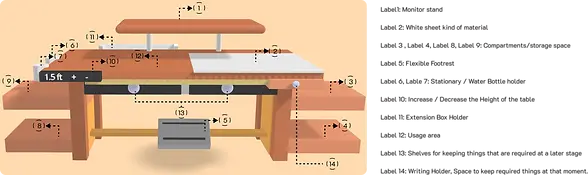
Smart Solutions for an Efficient Home Office Setup
-
Quick Note-Taking: Integrated a whiteboard sheet on the table surface for users to jot down ideas or notes during meetings, promoting efficient communication.
-
Ergonomic Adjustability: Designed an adjustable-height table to prevent discomfort from prolonged sitting and accommodate users of varying heights.
-
Enhanced Accessibility: Included a flexible footrest to ensure users can comfortably reach and maintain correct posture.
-
Convenient Storage: Added two side holders for water bottles and stationery, keeping essentials within easy reach
-
Customizable Setup: Featured a movable extension holder, allowing users to adjust table placement to suit their preferences.
-
Eye Comfort: Integrated a monitor stand to reduce eye strain by positioning the screen at an ergonomic distance.
-
Versatile Slider: Included a front slider under the white sheet for writing support or as additional storage space.
-
Organizational Shelves: Added shelves to declutter the workspace, boosting productivity and maintaining an organized environment.

Enhancing Workspace Design Through Feedback
01
Optimized Space Efficiency:
What happens when the table’s width takes up too much room? See how I tackled this without sacrificing functionality.
03
Intuitive Shelf Design:
Struggling with unclear shelf indicators? Discover the visual cues that made opening shelves effortless.
02
Ergonomics Redefined:
Built-in laptop stands and integrated switchboards—why settle for tangled wires when the workspace can be seamless?
04
Iterative Perfection: See how each feedback loop improved the workspace for better functionality and usability.
Designing Within Constraints: User-Driven Changes
Prioritizing Impactful Changes
-
Prioritizing What Matters: How do you deliver the most value under tight constraints? See how I tackled key feedback points.
-
Space-Saving Redesign: Discover how reducing table width improved workspace efficiency without sacrificing functionality.
-
Simplifying Usability: Learn how adding clear signifiers made shelves intuitive and frustration-free for users
Aligning Feedback with Impact
-
User-Centric Decisions: Focused on key user feedback to address major pain points effectively.
-
Impactful Improvements: Prioritized changes that delivered meaningful benefits to users.
-
Meeting Deadlines: Balanced user needs with project timelines for a successful outcome.
Feedback-Driven Customization
-
Flexible Storage Design: Created movable compartments to adapt to different home space constraints.
-
Customizable Setup: Enabled users to reposition storage units inside or outside the table based on their needs.
-
User-Centric Functionality: Designed a versatile table to suit diverse workspaces, ensuring a tailored and efficient solution.
Learning from the project
-
Empathy First: Understand user pain points to craft meaningful solutions.
-
Research Matters: Combine primary and secondary research for informed designs.
-
Define Problems Clearly: Target specific needs for streamlined solutions.
-
Ideation Sparks Innovation: Generate diverse ideas for creative solutions.
-
Prototype & Test: Validate concepts early to refine designs.
- Simplicity Wins: Simple designs have the greatest impact.
-
Feedback Refines: User testing improves the final product.
-
Prioritize Well-Being: Ergonomic features ensure comfort and health.
-
Creative Thinking: Innovative ideas lead to effective outcomes.
-
Iterate & Improve: Refine designs continuously based on feedback.
Looking for a UX Designer?
JP Nagar , Bangalore
Thank you for taking the time to review my portfolio.
I appreciate your interest in my work. If you found the project valuable, I’d love to hear your thoughts. Feel free to reach out through the form below for any feedback or to explore potential opportunities. Looking forward to connecting!
Thank you
Thank you for taking the time to explore my work! Curious to see more? Feel free to explore the options below and discover how my skills and experience align with your needs. Whether you're looking for creativity, problem-solving, or user-focused design, there's plenty here to dive into. Don’t forget to check out my other projects for a broader perspective. Let’s connect and take the next step!